Undergraduate Research Center
Conference Travel
Travel Support for Undergraduate Research
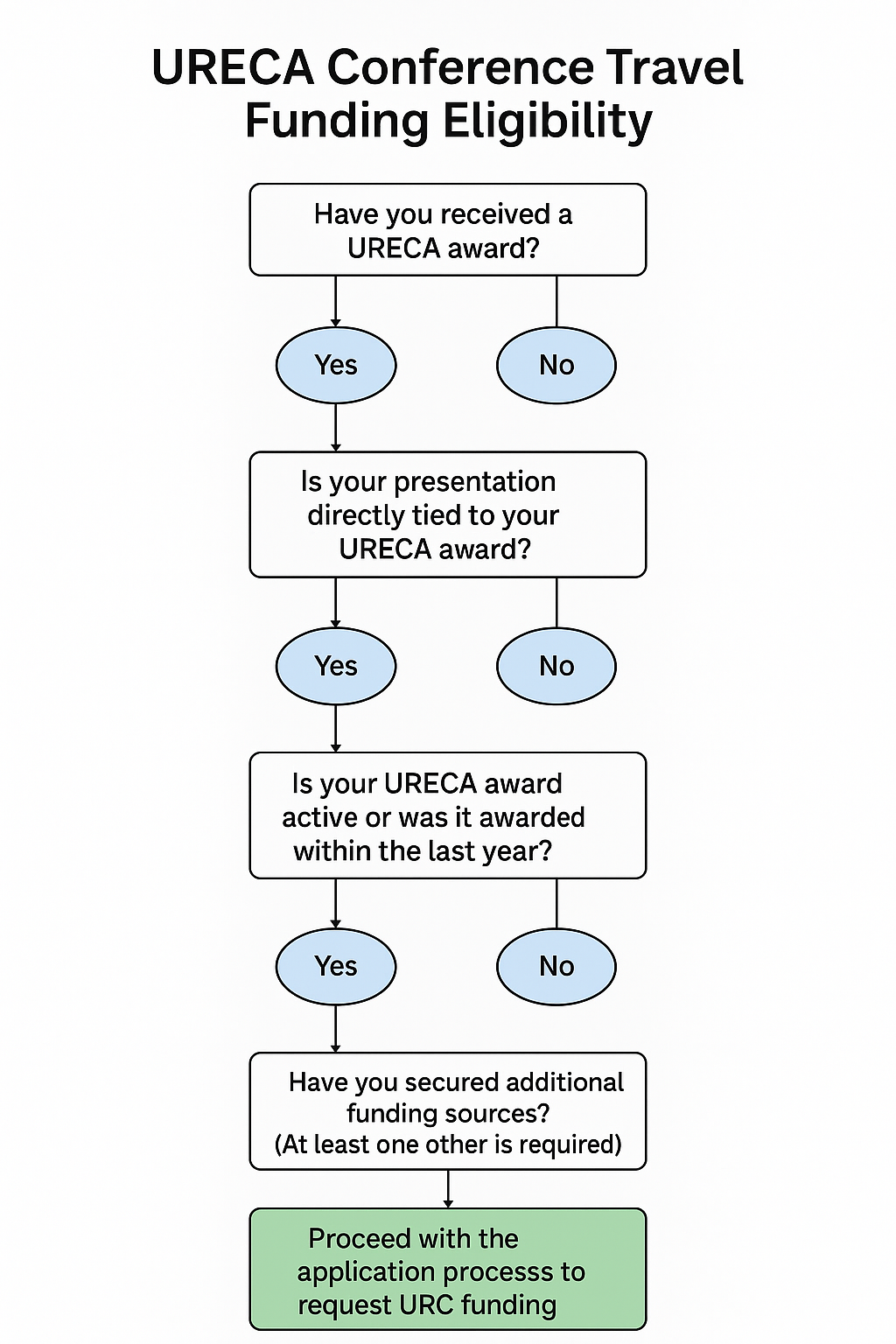
The Undergraduate Research Center (URC) strives to support students in disseminating their research and creative activity. Undergraduate students who have received a URECA grant and are accepted to present their research at a regional, state, national, or international conference are eligible to request travel funding.
Policies and Eligibility
- Eligibility: URC travel funding is available only to students who have received a URECA grant that is currently active or was awarded within the past twelve months.
- Presentation Requirement: Students must be presenting their URECA project.
- Funding Limits:
- Up to $300 may be requested for domestic travel.
- Up to $400 may be requested for international travel.
- Single Conference Allowance:
Each URECA award is eligible for only one conference travel funding award. If a student uses their travel award to attend a major event such as NCUR or ICUR, that award is considered the single conference funding allocation for that specific URECA project. Subsequent conferences within the same project period will not be eligible for additional URC travel funding. - Reimbursement Basis:
Travel funds are issued on a reimbursement basis and may be used for lodging, transportation, and registration fees. Meals and other incidental expenses are not eligible for reimbursement. - Cost Sharing:
Each application must demonstrate at least one additional source of funding (e.g., departmental support, academic college, Honors College, etc.) to ensure that costs are shared between the URC and other units. - Fiscal Responsibility:
In accordance with the MTSU Travel Policy, “Travelers must exercise good judgment and conduct all aspects of travel in a cost-efficient manner.” For example, travelers should select the least expensive reasonable mode of transportation and carpool when possible for team travel.
Application Process (Prior to travel)
To apply for these funds, you need to complete two forms:
- URC Conference Travel Application includes documentation of the invitation to present AND
- Travel Authorization Form (This form is not required for travel within the state of Tennessee.)
- This form must be submitted 30 days before domestic travel or 60 days before international travel
- This form will not be processed until the URC Travel Application form (listed above) has been submitted.
- Be prepared to attach screenshots of all estimated expenses as one PDF document. Note: Meals are not a covered expense.
- Before filling out this form, please email Casey Penston at Casey.Penston@mtsu.edu to obtain the specific Index and Account codes, as well as the approvers.
- You will be notified by email within a few days after submission if your request to travel has been approved. If approved, the correspondence will include your travel authorization number (TA).
- *Helpful hint: Form submissions are timed. If more time is needed, click “Save Progress” at the bottom of the form to avoid having to start over.
- Questions? See our FAQ section below.
Reimbursement Process (Post travel)
To obtain reimbursement upon returning from travel, you need to complete the following form:
- Travel Claim Form
- This form must be submitted within 30 days of your return
- This form will not be processed until the URC Travel Spotlight form (listed above) has been submitted.
- Be prepared to attach original receipts reflecting all expenses as one PDF document. Note: Meals are not a covered expense.
- Prior to filling out this form, please locate your TA number in the approval email (you will not have a TA number if you travel within the state of Tennessee).
- Once submitted and all signatures are routed for approval, your reimbursement will be processed within 6 weeks.
- *Helpful hint: Form submissions are timed. If more time is needed, click “Save Progress” at the bottom of the form to avoid starting over.
- Questions? See our FAQ section below.
FAQ
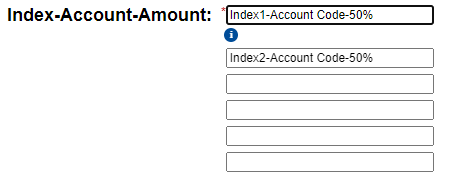
An index is a numerical code that indicates where the funding is coming from. Since conference travel requires two funding sources, you will enter two indexes on the forms. As seen below, simply place the second index-account-amount in the next line.
Still have questions?
Please email Madison Yahn at Madison.Yahn@mtsu.edu.
Fall URECA DeadlineThursday, September 3 at 4:30 pm